Saturday, 6 October 2012

Understanding the content of the APT_DUMP_SCORE report

How do I read and interprete the results from the APT_DUMP_SCORE report?


The APT_DUMP_SCORE report documents activity within the InfoSphere Information Server parallel engine. The parallel engine is a runtime engine that uses a combination of interpreted and compiled code to extract, transformation and load of data. The InfoSphere DataStage Designer enables you to specify the data flow and processing steps in a job, without having to specify the degree and nature of parallel processing which happens during job run time.


A configuration file (APT_CONFIG_FILE) specifies the nature and amount of parallelism, and the specific resources that are used to run a job. When a job is to be executed, the data flow information in the compiled job is combined with the configuration file to produce a detailed execution plan called the score. The score is useful in analyzing job performance and diagnosing problems in jobs. If the user sets the environment variable APT_DUMP_SCORE, a text representation of the score (a report) is written to the job’s log.
The job score that populates the report includes information about all operators in the job, including operators that are automatically inserted by the Designer client. The score shows how many nodes each operator runs on, and the anticipated flow of the job as it goes from operator to operator through internal data sets.


To see the score in the job log, enable APT_DUMP_SCORE (by defining it and supplying a value) either on the job level, project level, or the system level. Enabling APT_DUMP_SCORE at the system level results in all parallel jobs providing a dump score report, and is ideal for development and quality assurance environments.
This document provides a start in understanding how your job works, and further analyzing job issues.
The following score example is a fairly small job. When you enable APT_DUMP_SCORE and then run a job, you might typically see in the log the following text:

main_program: This step has 10 datasets:
ds0: {op0[1p] (sequential PacifBaseMCES)
eOther(APT_ModulusPartitioner { key={ value=MBR_SYS_ID }
})<>eCollectAny
op1[4p] (parallel RemDups.IndvIDs_in_Sort)}
ds1: {op1[4p] (parallel RemDups.IndvIDs_in_Sort)
[pp] eSame=>eCollectAny
op2[4p] (parallel RemDups)}
ds2: {op2[4p] (parallel RemDups)
[pp] eSame=>eCollectAny
op6[4p] (parallel buffer(0))}
ds3: {op3[1p] (sequential PacifGalaxyMember)
eOther(APT_ModulusPartitioner { key={ value=MBR_SYS_ID }
})<>eCollectAny
op4[4p] (parallel IndvIdJoin.toIndvIdJoin_Sort)}
ds4: {op4[4p] (parallel IndvIdJoin.toIndvIdJoin_Sort)
eOther(APT_HashPartitioner { key={ value=MBR_SYS_ID }
})#>eCollectAny
op5[4p] (parallel inserted tsort operator {key={value=MBR_SYS_ID, subArgs={asc}}}(0) in IndvIdJoin)}
ds5: {op5[4p] (parallel inserted tsort operator {key={value=MBR_SYS_ID, subArgs={asc}}}(0) in IndvIdJoin)
[pp] eSame=>eCollectAny
op7[4p] (parallel APT_JoinSubOperatorNC in IndvIdJoin)}
ds6: {op6[4p] (parallel buffer(0))
[pp] eSame=>eCollectAny
op7[4p] (parallel APT_JoinSubOperatorNC in IndvIdJoin)}
ds7: {op7[4p] (parallel APT_JoinSubOperatorNC in IndvIdJoin)
[pp] eAny=>eCollectAny
op8[4p] (parallel APT_TransformOperatorImplV22S14_ETLTek_HP37FMember_PMR64262_Test1_SplitTran2 in SplitTran2)}
ds8: {op8[4p] (parallel APT_TransformOperatorImplV22S14_ETLTek_HP37FMember_PMR64262_Test1_SplitTran2 in SplitTran2)
eSame=>eCollectAny
op9[4p] (parallel buffer(1))}
ds9: {op9[4p] (parallel buffer(1))
>>eCollectOther(APT_SortedMergeCollector { key={ value=MBR_SYS_ID,
subArgs={ asc }
}
})
op10[1p] (sequential APT_RealFileExportOperator in HP37_OvaWestmember_extract_dat)}
It has 11 operators:
op0[1p] {(sequential PacifBaseMCES)
on nodes (
node1[op0,p0]
)}
op1[4p] {(parallel RemDups.IndvIDs_in_Sort)
on nodes (
node1[op1,p0]
node2[op1,p1]
node3[op1,p2]
node4[op1,p3]
)}
op2[4p] {(parallel RemDups)
on nodes (
node1[op2,p0]
node2[op2,p1]
node3[op2,p2]
node4[op2,p3]
)}
op3[1p] {(sequential PacifGalaxyMember)
on nodes (
node2[op3,p0]
)}
op4[4p] {(parallel IndvIdJoin.toIndvIdJoin_Sort)
on nodes (
node1[op4,p0]
node2[op4,p1]
node3[op4,p2]
node4[op4,p3]
)}
op5[4p] {(parallel inserted tsort operator {key={value=MBR_SYS_ID, subArgs={asc}}}(0) in IndvIdJoin)
on nodes (
node1[op5,p0]
node2[op5,p1]
node3[op5,p2]
node4[op5,p3]
)}
op6[4p] {(parallel buffer(0))
on nodes (
node1[op6,p0]
node2[op6,p1]
node3[op6,p2]
node4[op6,p3]
)}
op7[4p] {(parallel APT_JoinSubOperatorNC in IndvIdJoin)
on nodes (
node1[op7,p0]
node2[op7,p1]
node3[op7,p2]
node4[op7,p3]
)}
op8[4p] {(parallel APT_TransformOperatorImplV22S14_ETLTek_HP37FMember_PMR64262_Test1_SplitTran2 in SplitTran2)
on nodes (
node1[op8,p0]
node2[op8,p1]
node3[op8,p2]
node4[op8,p3]
)}
op9[4p] {(parallel buffer(1))
on nodes (
node1[op9,p0]
node2[op9,p1]
node3[op9,p2]
node4[op9,p3]
)}
op10[1p] {(sequential APT_RealFileExportOperator in HP37_OvaWestmember_extract_dat)
on nodes (
node2[op10,p0]
)}
It runs 35 processes on 4 nodes.


The dump score contains two sections -- the data sets (DS) and the operators (OP).
Data sets - The data sets that are listed in the score are the same type of data sets that you create with the Data Set stage -- in this context, they are temporary memory and/or disk storage during the job's run.
Operators - Operators are individual parallel engine stages that you might see on the user interface.


In a typical job flow, operators are end-points, and data sets are the links between the operators. (An exception is when data sets are used to actually output to a file.)


Each and every link on the job design is potentially a data set. However, unlike the data set stage which you put in your resource disk group by using the specified node pool within the job's configuration file (APT_CONFIG_FILE), these data sets are in memory. These temporary data sets are only placed in the scratch disk space when an imposed limit is reached. A limit can be imposed due to environment settings, or due to physical memory limitations.


Each operator listed in the score spawns a number of processes that are dependent on:
  • the job's established configuration file (APT_CONFIG_FILE)
  • constrained by the node pool settings
  • the operator configuration in the parallel engine code
  • Several environment variables, such as APT_DISABLE_COMBINATION, being set/unset.
First, let us focus on the operators, which are listed after the data sets in the score:
op0[1p] {(sequential PacifBaseMCES)
on nodes (
node1[op0,p0]
)}
op1[4p] {(parallel RemDups.IndvIDs_in_Sort)
on nodes (
node1[op1,p0]
node2[op1,p1]
node3[op1,p2]
node4[op1,p3]
)}


In the proceeding example, the two operators are: op0 and op1. The operator name is prefixed with the code name "op" and appended with an incremental numeric value starting with zero (0). Next to the operator name, there is an enclosed bracket with a value that is followed by the letter "p", for example, "[1p]". The value indicates the number of partitions given to that operator by the engine. For the first operator, only one (1) partition is provided, and the second operator is given four (4) partitions.

Within the curly brackets, the execution mode ("parallel" or "sequential") and the name of that operator is provided. The operator name is based on the name shown on the parallel canvas in the Designer client. The operator name is not the same as the operator type.

In the proceeding example, the first operator is listed as "PacifBaseMCES" and is the stage name in its entirety. However, the second operator, is listed as "remDups.IndvIDs_in_Sort". The stage name"IndvIDs" is renamed to indicate that the sort process triggered by the remove duplicate stage occured.

Following each operator name are the specific nodes that the operators are tagged to run on. In the proceeding example, node1 is for the first operator, and node1, node2, node3, and node4 are for the second operator. The name of nodes are defined in your configuration file (APT_CONFIG_FILE).


Now let us focus on the data sets:

ds0: {op0[1p] (sequential PacifBaseMCES)
eOther(APT_ModulusPartitioner { key={ value=MBR_SYS_ID }
})<>eCollectAny
op1[4p] (parallel RemDups.IndvIDs_in_Sort)}
ds1: {op1[4p] (parallel RemDups.IndvIDs_in_Sort)
[pp] eSame=>eCollectAny
op2[4p] (parallel RemDups)}

The name of the data set is provided first. Within the curly brackets, there are three stages:
  • the source of the data set - operator 0, sequential PacifBaseMCES
  • the activity of the data set - operator 1, parallel RemDups.IndvIDs_in_Sort
  • the target of the data set - operator 2, parallel RemDups

The source and target are usually operators, although you might see a specific file name provided that indicates that the operator is referencing and reading from a physical data set.


The first data set, ds0, partitions the data from the first operator ("op0" running in 1 partition). The data set uses APT_ModulusPartitioner (sometimes referred to as modulus) to partition. (Note: APT means Advanced Parallel Technology.) The modulus partitioning is using the key field MBR_SYS_ID in this scenario. The partitioning data is being sent to the second operator (op1 running in 4 partitions). Logically, this means that the data is being partitioned in 4 partitions using the modulus method.


The second data set, "ds1", reads from the second operator ("op1" running 4 partitioning). The second data set uses the eSame method to partition and sends the data over to the third operator ("op2" running 4 partitioning). One special note: the value "[pp]" means preserved partitioning. Preserved partitioning is an option that is usually set by default in the GUI. If data must be repartitioned, the "[pp]" flag is overridden and a warning message is triggered.


In the example for the first dataset, you see "eOther" and "eCollectAny".These are input and target read methods. The second method indicates the method that the receiving operator uses to collect the data.


In this example, "eOther" is the originating or input method for op0. It is an indication that something else is being imposed outside the expected partitioning option (and that you need to observe the string within the parenthesis -- APT_ModulusPartitioner in this example -- Modulus partitioning is imposed.)


"eCollectAny" is the target read method. Any records that are fed to this data set are collected in a round robin manner. The round robin behavior is less significant than the behavior that occurs for input partitioning method, which is eOther(APT_ModulusPartitioner) for ds0.


In the first example in this document, where the operator and stage uses the APT_SortedMergeCollector for ds9, the "eCollectOther"method indicates where actual partitioning occurs and is usually specified when you are referencing a sequential flat file. Shown again, in part, is the example:


ds8: {op8[4p] (parallel APT_TransformOperatorImplV22S14_ETLTek_HP37FMember_PMR64262_Test1_SplitTran2 in SplitTran2)
eSame=>eCollectAny
op9[4p] (parallel buffer(1))}
ds9: {op9[4p] (parallel buffer(1))
>>eCollectOther(APT_SortedMergeCollector { key={ value=MBR_SYS_ID,
subArgs={ asc }


The symbols between the originating partitioning method and the target read method translates to the parallelism of the partitioning. The following is the list of the symbols, and their definition:
-> Sequential to Sequential
<> Sequential to Parallel
=> Parallel to Parallel (SAME)
#> Parallel to Parallel (NOT SAME)
>> Parallel to Sequential
> No Source or Target


In summary:
Operator "op0" runs first in sequential mode on node "node1", and send data to data set "ds0". Data set "ds0" is partitioned using the modulus partitioning method data provided from sequential to parallel (4 ways) where it is sent to operator "op1" running in parallel mode on "node1", "node2", "node3", and "node4". Operator "op1" then handles the collected data, and sends the results to data set "ds1". Data set "ds1" just provides data in the same partitioning order for "op2" operator as it was for "op1" operator.


This is the basic concept of how the parallel engine works at runtime, and what is shown in the dump score report.

* * *

The dump score report also can tell you when the parallel engine inserted an operator based on its internal analysis of each operator's requirements. For example, Join stages require that the data be sorted, but the GUI does not require that you supply the sort details. The engine is intelligent enough to realize that a sort is required, and supplies the requirement itself. You can see the behavior in the following example:


op5[4p] {(parallel inserted tsort operator {key={value=MBR_SYS_ID, subArgs={asc}}}(0) in IndvIdJoin)
on nodes (
node1[op5,p0]
node2[op5,p1]
node3[op5,p2]
node4[op5,p3]
)}

In the example, tsort is the name of the sort operator being used. As part of this insertion, the data is repartitioned based on the same key as the hash partitioning:


ds4: {op4[4p] (parallel IndvIdJoin.toIndvIdJoin_Sort)
eOther(APT_HashPartitioner { key={ value=MBR_SYS_ID }
})#>eCollectAny
op5[4p] (parallel inserted tsort operator {key={value=MBR_SYS_ID, subArgs={asc}}}(0) in IndvIdJoin)}

All of this partitioning and sorting provided in the proceeding example is for the Sort stage:

***

ds5: {op5[4p] (parallel inserted tsort operator {key={value=MBR_SYS_ID, subArgs={asc}}}(0) in IndvIdJoin)
[pp] eSame=>eCollectAny
op7[4p] (parallel APT_JoinSubOperatorNC in IndvIdJoin)}
[...]
op7[4p] {(parallel APT_JoinSubOperatorNC in IndvIdJoin)
on nodes (
node1[op7,p0]
node2[op7,p1]
node3[op7,p2]
node4[op7,p3]
)}
***

If you have a keen eye, you might have already noticed a problem with this particular dump score report: one of the two input links for that sort stage ("op7") is partitioned using modulus order ("ds0"), while the other input link is partitioned using hash partitioning ("ds4"). The hash partitioning overrode the initial modulus partitioning request ("ds3").

The first modulus insertion was overridden because the engine detected that the job design did not supply the required fields. Quite frequently, the key fields are supplied in the wrong order, or the job is using different key fields that break the compatibility of the data order requirements for the downstream stages. It is important to review the APT_DUMP_SCORE report and confirm that your valid job design is interpreted correctly by the parallel engine. Ensure that your intended design is correctly implemented.

***

One additional detail from the above dump score you may be wondering about
op6[4p] {(parallel buffer(0))
on nodes (
node1[op6,p0]
node2[op6,p1]
node3[op6,p2]
node4[op6,p3]
)}

Buffer operators are specifically for instances where the downstream operator is at risk of getting overloaded with data while it is processing. Buffer operators are an attempt to produce a buffer zone where two things happen:

1.The buffer operator communicates with the upstream operator to slow down its sending of data.
2.The buffer operator holds on to the data until the downstream operator is ready for the next block of data.

If you are wondering why your job is running slower than other jobs, seeing the number of buffers in effects provides a clue. Buffer operators serve a valuable purpose: the prevention of race conditions between operators. Disabling buffering can cause severe and hard-to-analyze problems. However, better job design can reduce the amount of buffering that occurs.

***

The following detail is not seen above, but is possible:

op1[2p] {(parallel APT_CombinedOperatorController:
(APT_TransformOperatorImplV0S1_TrafoTest1_Transformer_1 in Transformer_1)
(Peek_2)
) on nodes (
node1[op1,p0]
node2[op1,p1]
)}


Data sets take up memory. As part of optimization, jobs try to combine multiple operators that handle data in the same way (for example, without any requirement to change the partition or sort order for the data flow). Data is immediately handed off to the next operator when processing is completed in the prior operator with significantly less memory impact.


In the immediately proceeding example, there are two operators that are combined: a Transformer and a Peek, running on two partitions.


When the job log indicates an error occurred in "APT_CombinedOperator", the APT_DUMP_SCORE report can help you identify which of the combined operators is suspect. To better pinpoint the culprit, enable the environment variable APT_DISABLE_COMBINATION. The environment variable can help you to identify the stage with the error.


Self-training exercises:


1.    What does the dump score of your job looks like when you run it using 1 node configuration file compared to a multiple nodes configuration file?


2.    What happens to the dump score when you enable APT_DISABLE_COMBINATION on a job?


3.    How does the APT_DUMP_SCORE determine multiple inputs and outputs for the jobs, such as multiple references, and multiple output files?


4.    What happens to the dump score if, instead of using the internal sort option of the join stage, the customer uses a separate sort stage?

5.    What happens if the following environment variables are set: APT_NO_PART_INSERTION?
APT_NO_SORT_INSERTION? For 8.7 and higher - APT_NO_PARTSORT_OPTIMIZATION?

6.    What happens to the symbol between the partitioning method and eCollectAny when you change the partitioning methods for a single link?
How does it look like at the target data set?

7.    What happens when you add a sequential file for input and output with no other operators in between?
 
Ref# IBM
Read more ...>>

Friday, 5 October 2012

IBM Information Server Services and ASB Agent


What Is IBM Information Server Services? 

A service receives a request from an application, and this request will be passed to the 
processing Information Server product module (DataStage Jobs or Queries) where the 
request will be processed and the result will be sent back to the application. Services 
follow a “request and respond” technique in a service-oriented architecture. 


What Is ASB Agent? 

ASB stands for “Application  Service  Backbone”. An ASB agent is a Java based 
background process running on all machines that have an IBM Information Server 
engine installed. Whenever there is a request for service that needs processing by the 
IBM Information Server component, ASB agent receives and conveys the request. ASB 
agent acts as a bus over which the services are delivered. ASB agent is a 
communicator between the service tier and engine tier within the IBM information server 
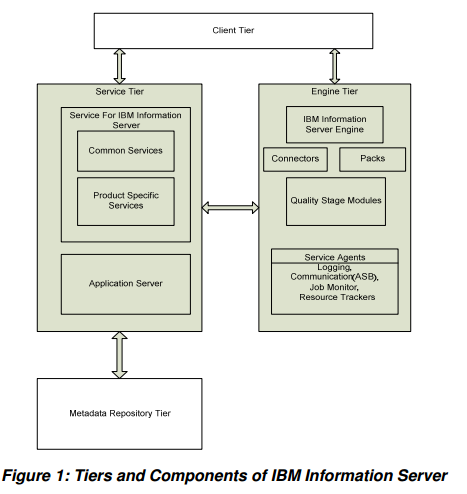
topology. See Figure 1.


As shown in Figure 1, the IBM Information Server includes four tiers—Client Tier, 
Services Tier, Engine Tier, and Metadata Repository Tier.  Each of these tiers are 
described below. 


Client Tier 

Client tier is used to develop, deploy and administrate the information server. The client 
tier includes the IBM Information Server Console, IBM WebSphere DataStage and 
QualityStage and other product client modules. It is important  to note that IBM 
Information Server product client modules are not web based. 


Services Tier 

Services tier handles common services and product specific services. This tier has 
access to the Engine tier and Metadata repository tier. This services tier contains IBM 
WebSphere Application Server, and services for IBM Information Server.


Engine Tier 

Engine tier is where all the jobs and other processing will run. This tier includes IBM 
Information Server Engine and its components. ASB agent is part of IBM WebSphere 
DataStage Engine; when you install the IBM Information Server Engine, the ASB 
communication agent will also be installed. 


Metadata Repository Tier 

Metadata repository is a database that stores the metadata and other data for the IBM 
Information Server and all product modules. The IBM Information Server services are 
hosted by Application Server (Service Tier) and connect to the Metadata Repository 
Tier to store and retrieve data from the database.

All of the above described tiers work closely together to provide services for client 
applications. ASB agent, as a communicator, receives and conveys the services from 
the service tier to the engine tier. (This communication agent is only needed if the 
WebSphere DataStage Server and WebSphere Application Server are on separate 
machines.) 


Service Message Flow and ASB Agent Building Blocks 

When a service is requested, a sequence of steps occurs for processing the request. 
Figure 2 describes two ASB agents with a single Information Services Director server. A 
service request will arrive at WISD (WebSphere Information Services Director) Endpoint 
and is handed over to the ASB adapter. The service  will carry information about the 
requested operation. These operation details are used to determine the providers that will 
process the request. ASB adaptor will pass the request to ASB agent. 
If more than one ASB agent is available then the load balancer in the ASB adaptor is used 
to pass the request to the correct ASB agent. Once the ASB agent receives the request it 
will be placed in the operation queue until a slot is available in the pipeline. When a slot is 
available, the request will be moved from the operation queue to the pipeline. The request will 
then be processed by DataStage jobs or Queries. See Figure 2.


Processing a Service Request using a Datastage Job 

In the DataStage job, (See Figure 3), a service request enters through WISD_Input 
stage (as arguments in columns tab).  Argument values are interpreted as rows, and 
mapped to the other stages for processing. Finally, the processed data rows are 
provided to the client application through the WISD_Output stage. For service-oriented 
architecture implementation, jobs need to be always running (Always-on behavior). 
Jobs can also have multiple instances to handle/process many requests.


Role of ASB Agent to Handle Job Instances 

ASB agent plays a key role in handling a service request, ASB agent starts the job 
instances ahead of the service requests to get rid  of latency, and to deliver a high 
throughput rate in messaging/communicating with the service client. 
The ASB agent takes care that a minimum number of active instances are available for 
service requests. At the same time, ASB agent also  reduces the active job to a 
minimum limit. ASB agent never starts a new instance when a maximum active limit is 
attained. 


Summary 

The ASB agent is part of the ISF – Information Service Framework, that provides a 
means of passing requests from the ASB server (i.e. the location where the IBM 
Information Server is installed) to the remote client (i.e. to where the ASB agent is 
located) without the need of a complete J2EE Application Server at each client location. 
To sum up, the foremost task of the ISF agent (ASB agent) is to route requests and 
return responses. This is accomplished by ASB agent serving as a communicator 
between the service tier and engine tier.  This communication occurs via a background 


process that runs on the IBM Information Server.  Finally, ASB agent is only needed 
when the WebSphere DataStage and Application Servers are on separate machines. 


Read more ...>>

Thursday, 4 October 2012

DataStage Tip For Beginners: Developer Short Cuts

Import-Export

* When you do an export cut and paste the export file name. When you go to your project and run an import paste the file name instead of having to browse for it. While export and import independently remember the last file name used they do not share that name between each other.


* When you switch export type between category and individual job it is quick to switch the type, close the export form and open it again. That way the job name or category you have highlighted will be automatically picked.
There is an Export option to export by individual job name or export by category name. This is on the second tab in the export form. Often when you go to export something it is on the wrong option, eg. you want a job but it is showing the category. You switch from category export to individual job export but back on tab 1 your job is still not highlighted.
* When you do an export there is a "View" button, click this to open the export file and run any type of search and replace on job parameter values when moving between dev and test.
* If you want to export several jobs that are not in the same category use the append option. Highlight and export the first job. Close the export window, find and highlight the second job, in the export form click the "Append" option to add to the file. Continue until all jobs have been selected and exported.
* On the Options tab is a check box to include in the export "Referenced shared containers" to also export those.


Things you could easily miss:
You could use DataStage for months and not see some of these time savers.
* There is an automap button in a lot of stages, especially the transformers, maps fields with the same names.

* When you add a shared container into your job you need to map the columns of the container to your job link. What you might miss is the extra option you get on the Columns tab "Load" button. In addition to the normal column load you get "Load from Container" which is a quick way to load the container metadata into your job.
* Don't create a job from an empty canvas. Always copy and use an existing job. Don't create shared containers from a blank canvas, always build and test a full job and then turn part of it into a container.
* If you want to copy and paste settings between jobs, for example database login values or transformer functions, open each job in a seperate Designer session. Most property windows in DataStage are modal and you can only have one property window open per Designer session, by opening two Designers you can have two property windows open at the same time and copy or compare them more easily.
* You can load metadata into a stage by using the "Load" button on the column tab or by dragging and dropping a table definition from the Designer repository window onto a link in your job. For sequential file stages the drag and drop is faster as it loads both the column names and the format values in one go. If you used the load button you would need to load the column names and then the format details seperately.
* Can't get a Modify function or Transformer function working correctly? Trial and error is often the only way to work out the syntax of a function. If you do this in a large and complex job it can be time consuming to debug due to job startup times. Consider have a couple test jobs in your dev project with a row generator, a modify or transformer stage and a peek stage. Have a column of each type in this test job. Use this throughout your project as a quick way to test a function or conversion.
* You can put job parameters into stage properties text boxes, eg. #filedir#/#filename# but you may not know that you can put macros into property text boxes. #filedir#/#filename#_#DSJobName#. In this example the first two are job parameters and the third value is not, it's a DataStage macro.


Sequence Jobs
My most annoying Sequence job "feature" is the constant need to enter job parameters over and over and over again. If you have 10-20 parameters per job (as I normally do) it becomes very repetitive and is open to manual coding errors.
Under version 7.1 and earlier you could copy and paste a job activity stage, change the job name and retain most of the parameter settings. Under 7.5.x when you change the job name all the parameter settings get wiped.

You need to set the parameters for every flippin job activity stage, even though they are likely to have the same or similar parameter lists and settings. A faster way is to do the job renaming in an export file.
* In an empty sequence job add your first job activity stage and set all parameter values or copy one in from an existing job.
* Copy and paste as many copies of this job activity as you need for your sequence.
* Close the sequence job and export the job and click the View button.
* Open the sequence job, you need it to retrieve the stage names.
* Copy the name of the last job activity stage name and search for it in the export file. When the cursor is on that part of the export file search and replace the old job name with the new job name. Make sure you only replace to the bottom of the file, most text editors should have this option. This will rename the job of the last activity stage.
* Repeat this for the second last job activity, then the third last etc until you have replaced all job names back to the second job activity stage.
* Import the job into your project.

This should give you the same set of job activity stages but with each one pointing at a different job and with the full set of job parameters set.


Debugging

* In parallel jobs I use the copy stage a lot to debug errors that do not indicate which stage caused the error. I create a copy of the job and start removing output stages, replacing them with a copy stage. I progressively remove stages until I locate the one with the error.
Read more ...>>

Wednesday, 3 October 2012

The DataStage 8.5 Job Migration Assistant Makes Upgrading, Testing and Deployment Easier

IBM have released a tool that makes product upgrades and environment management and job deployment and regression testing easier.

This is more than a Migration Assistant, it is useful for migrating between DataStage versions but it is also useful for migrating DataStage jobs from a development environment to testing and production.  It is useful for managing duplicate versions of jobs, executing test plans or job documentation.


The DataStage Migration Assistant PDF doc can be downloaded here and according to the support website:

The Job Migration Test Assistant tool is a web-based application which assists in migration of DataStage projects from previous releases into the 8.5 release. The Job Migration Test Assistant can compare the status of DataStage jobs or sequences between the older version and the newer version, and perform difference analysis including job level or table schema level checks. Reports can be genrated based on anomalies in the data between the versions.

It is downloaded through the IBM Fix Central website which means anyone can access it.  There is a catch – the product requires a DB2 repository and it comes with a JMTA_DDL_DB2.sql script.  Information Server can store its repository on DB2, SQL Server or Oracle so there will be some sites out there without DB2.  You can use the free express version of DB2 or the version that comes bundled with Information Server.
It comes with a couple prerequisites – two interim fixes for Information Server 8.5.


Migration Assistant for Upgrades

Here is a screenshot of the DataStage job overview showing jobs in the new environment of various statuses – Failed, Not Completed, Compiled, Ran Successfully and Ran with Warnings.  It has another graph for the new environment – Missing and New.


Migration Assistant for Environment Management

There is a lot more to the product than just upgrading DataStage.  The Migration Assistant can help to migrate between environments on the same version – for example synchronising your development, test and production environments.  Finding duplicate jobs between projects and merging them.
There is a tree for comparing objects between environments and comparing DataStage jobs:


Migration Assistant for Testing

The Migration Assistant has some functions to help unit test an environment upgrade.  These same test functions can help for any type of DataStage testing – you can keep using the Migration Assistant as part of your standard test plan.  You can compare a release of DataStage jobs with the previous release by comparing a UAT test environment to a production environment, or by comparing a test environment to a test baseline environment.  With regression testing the baseline you are comparing against needs to be similar to the new set of jobs being tested.
It provides a regression testing check – the ability to find any link in any job that has a row count that is different to the regression test baseline.


Another regression testing feature is the log compare – this will compare all the logs for one environment against the logs in another environment to try and find something that is different in a DataStage job – such as a new warning, or an abort or unusual information messages.  There is currently no other feature in any Information Server product that lets you compare DataStage log messages.

=========================================================================================


Migrating to InfoSphere Information Server, Version 8.5 and Version 8.7


Technote (troubleshooting)

Problem(Abstract):
IBM offers a Concierge Program for free to provide guidance on the best approach to migrate to Information Server, Version 8.5 or Version 8.7. Hundreds of customers have taken advantage of the program. InfoSphere Information Server, Version 8.5 and Version 8.7 does not support upgrade in place. There are multiple ways to migrate to Information Server, Version 8.5 or Version 8.7 depending on the version of DataStage or Information Server you are migrating from, the Information Server products installed, and other factors. The Concierge Program is offered to all customers, but it is particularly important for customers using the InfoSphere Foundation Tools (Business Glossary, Metadata Workbench, FastTrack, Information Analyzer) to contact the Concierge Program for guidance and the recommended tools for migration.

In order for IBM to assist you, please send an email message to isconcierge@us.ibm.com. If you are a customer in Japan, please send an email message to InfoSphr@jp.ibm.com. You will be contacted with information and assistance to complete your migration.


Resolving the problem:

In your email message, please provide the following information:
Your name
Company name and address
Contact phone number
Your email address
Name of your IBM Account Representative, if known


Ref: http://www-01.ibm.com/support/docview.wss?uid=swg21445403
Read more ...>>

DataStage 8.1 to DataStage 8.5

1. DataStage Designer performance improvement By changing the Metadata algorythm, copy/delete/save jobs got faster about 30-40%.


2. Parallel Engine Performance and Resource improvements Resource usage is about 5% smaller than 8.1, for T-Sort, Windows desktop heap size has been decreased 94%. 


3. Transformer enhancements Key break support
LastRowInGroup() function is added. This will return true for the last record of the group.
LastRow() will return the last record of input.
Output looping :: Allows multiple output records to be created per single input record.
Input looping    :: Allows aggregation of input records so that aggregated data can be included with the original input data. ( like adding average column to the original input is now possible. ( 2 pass.... calculation. )
New Null handling This is pretty complicate and need more verification by myself to explain clearly. But this is the description I got.
Null values can now be included in any expression.
        -> Null values no longer need to be explicitly handled.
            A null value in an expression will return a null value result. As long as the target column is nullable, records will not be dropped. Stage variables are now always nullable.
APT_TRANSFORM_COMPILE_OLD_NULL_HANDLING is prepared to support backward compatibility.
New Transformer Functions
Create/offset a time, date or timestamp from component arguments
DateFromComponents(int32 years, int32 months, int32 dayofmonth)
DateOffsetByComponents(date basedate, int32 yearoffset, int32 monthoffset, int32 dayoffset) DateOffsetByDays(date basedate, int32 offset)
TimeFromComponents(int32 hours, int32 minutes, int32 seconds, int32 microseconds) TimeOffsetByComponents(time basetime, int32 houroffset, int32 minuteoffset, dfloat secondoffset) TimeOffsetBySeconds(time basetime, dfloat secondoffset)
TimestampOffsetByComponents(timestamp basetimestamp, int32 yearoffset, int32 monthoffset, int32 dayoffset, int32 houroffset, int32 minuteoffset, dfloat secondoffset)
TimestampOffsetBySeconds(timestamp basetimestamp, dfloat secondoffset)

Various packed decimal conversions
DecimalToDate(decimal basedecimal [,string format] )
DecimalToTime(decimal basedecimal [,string format] )
DecimalToTimestamp(decimal basedecimal [,string format] )
DateToDecimal(date basedate [,string format] )
TimeToDecimal(time basetime [,string format] )
TimestampToDecimal(timestamp basetimestamp [,string format] )


4. DataStage Function enhancements New Client \ Domain Compatibility Check Before/after routines now mask encrypted params Copy project permissions from existing project when creating new project Environment variable enhancements: creation during import Add PX Stage Reset Support Enhancement to Parallel Data Set Stage Multiple Null Field Values on Import Enhancements to improve Multi-Client Manager support

5. DataStage Serviceability enhancements New Audit Tracing Enhanced Exception Dialog ISA Lite Enhancements for DataStage Enhanced Project Creation Failure Details

6. ParallelPivot - Adding Vertical Pivoting

7. CVS (Code Version Control Integration) Information Server Manager was created on Eclipse from 8.1 Now the CVS or Subversion plugins to Eclipse are available for DataStage components.
Read more ...>>

DataStage FAQ and Best Practices

1. General Datastage issues


1.1. What are the ways to execute datastage jobs?
A job can be run using a few different methods:
* from Datastage Director (menu Job -> Run now...)
* from command line using a dsjob command
* Datastage routine can run a job (DsRunJob command)
* by a job sequencer


1.2. How to invoke a Datastage shell command?
Datastage shell commands can be invoked from :
* Datastage administrator (projects tab -> Command)
* Telnet client connected to the datastage server


1.3. How to stop a job when its status is running?
To stop a running job go to DataStage Director and click the stop button (or Job -> Stop from menu). If it doesn't help go to Job -> Cleanup Resources, select a process with holds a lock and click Logout
If it still doesn't help go to the datastage shell and invoke the following command: ds.tools.It will open an administration panel. Go to 4.Administer processes/locks , then try invoking one of the clear locks commands (options 7-10).


1.4. How to run and schedule a job from command line?
To run a job from command line use a dsjob command
Command Syntax: dsjob [-file | [-server ][-user ][-password ]] [ ]
The command can be placed in a batch file and run in a system scheduler.


1.5. How to release a lock held by jobs?
Go to the datastage shell and invoke the following command: ds.tools
It will open an administration panel. Go to 4.Administer processes/locks , then try invoking one of the clear locks commands (options 7-10).


1.6. User privileges for the default DataStage roles?
The role privileges are:
* DataStage Developer - user with full access to all areas of a DataStage project
* DataStage Operator - has privileges to run and manage deployed DataStage jobs
* -none- - no permission to log on to DataStage


1.7. What is a command to analyze hashed file?
There are two ways to analyze a hashed file. Both should be invoked from the datastage command shell. These are:
* FILE.STAT command
* ANALYZE.FILE command


1.8. Is it possible to run two versions of datastage on the same pc?
Yes, even though different versions of Datastage use different system dll libraries.
To dynamically switch between Datastage versions install and run DataStage Multi-Client Manager. That application can unregister and register system libraries used by Datastage.


1.9. How to send notifications from Datastage as a text message (sms) to a cell phone.
There is a few possible methods of sending sms messages from Datastage. However, there is no easy way to do this directly from Datastage and all methods described below will require some effort.
The easiest way of doing that from the Datastage standpoint is to configure an SMTP (email) server as a mobile phone gateway. In that case, a Notification Activity can be used to send message with a job log and any desired details. DSSendMail Before-job or After-job subroutine can be also used to send sms messages.
If configured properly, the recipients email address will have the following format:
600123456@oursmsgateway.com
If there is no possibility of configuring a mail server to send text messages, you can to work it around by using an external application run directly from the operational system. There is a whole bunch of unix scripts and applications to send sms messages.
In that solution, you will need to create a batch script which will take care of sending messages and invoke it from Datastage using ExecDOS or ExecSh subroutines passing the required parameters (like phone number and message body).
Please keep in mind that all these solutions may require a contact to the local cellphone provider first and, depending on the country, it may not be free of charge and in some cases the provider may not support the capability at all.


2. Datastage development and job design


2.1. Error in Link collector - Stage does not support in-process active-to-active inputs or outputs.
To get rid of the error just go to the Job Properties -> Performance and select Enable row buffer.
Then select Inter process which will let the link collector run correctly.
Buffer size set to 128Kb should be fine, however it's a good idea to increase the timeout.


2.2. What is the DataStage equivalent to like option in ORACLE
The following statement in Oracle:
select * from ARTICLES where article_name like '%WHT080%';
Can be written in DataStage (for example as the constraint expression):
incol.empname matches '...WHT080...'


2.3. what is the difference between logging text and final text message in terminator stage.
Every stage has a 'Logging Text' area on their General tab which logs an informational message when the stage is triggered or started.
* Informational - is a green line, DSLogInfo() type message.
* The Final Warning Text - the red fatal, the message which is included in the sequence abort message


2.4. Error in STPstage - SOURCE Procedures must have an output link.
The error appears in Stored Procedure (STP) stage when there are no stages going out of that stage.To get rid of it go to 'stage properties' -> 'Procedure type' and select Transform


2.5. How to invoke an Oracle PLSQL stored procedure from a server job.
To run a pl/sql procedure from Datastage a Stored Procedure (STP) stage can be used.
However it needs a flow of at least one record to run.
It can be designed in the following way:
* source odbc stage which fetches one record from the database and maps it to one column - for example: select sysdate from dual
* A transformer which passes that record through. If required, add pl/sql procedure parameters as columns on the right-hand side of tranformer's mapping
* Put Stored Procedure (STP) stage as a destination. Fill in connection parameters, type in the procedure name and select Transform as procedure type. In the input tab select 'execute procedure for each row' (it will be run once).


2.6. Is it possible to run a server job in parallel?
Yes, even server jobs can be run in parallel.
To do that go to 'Job properties' -> General and check the Allow Multiple Instance button.
The job can now be run simultaneously from one or many sequence jobs. When it happens datastage will create new entries in Director and new job will be named with automatically generated suffix (for example second instance of a job named JOB_0100 will be named JOB_0100.JOB_0100_2). It can be deleted at any time and will be automatically recreated by datastage on the next run.


2.7. Error in STPstage - STDPROC property required for stage xxx
The error appears in Stored Procedure (STP) stage when the 'Procedure name' field is empty. It occurs even if the Procedure call syntax is filled in correctly.
To get rid of error fill in the 'Procedure name' field.


2.8. Datastage routine to open a text file with error catching
Note! work dir and file1 are parameters passed to the routine.
* open file1
OPENSEQ work_dir : '\' : file1 TO H.FILE1 THEN
CALL DSLogInfo("******************** File " : file1 : " opened successfully", "JobControl")
END ELSE
CALL DSLogInfo("Unable to open file", "JobControl")
ABORT


2.9. Datastage routine which reads the first line from a text file
Note! work dir and file1 are parameters passed to the routine.
* open file1
OPENSEQ work_dir : '\' : file1 TO H.FILE1 THEN
CALL DSLogInfo("******************** File " : file1 : " opened successfully", "JobControl")
END ELSE
CALL DSLogInfo("Unable to open file", "JobControl")
ABORT
END

READSEQ FILE1.RECORD FROM H.FILE1 ELSE
Call DSLogWarn("******************** File is empty", "JobControl")
END

firstline = Trim(FILE1.RECORD[1,32]," ","A") ******* will read the first 32 chars
Call DSLogInfo("******************** Record read: " : firstline, "JobControl")
CLOSESEQ H.FILE1

END


2.10. How to test a datastage routine or transform?
To test a datastage routine or transform go to the Datastage Manager.
Navigate to Routines, select a routine you want to test and open it. First compile it and then click 'Test...' which will open a new window. Enter test parameters in the left-hand side column and click run all to see the results.
Datastage will remember all the test arguments during future tests.


2.11. When hashed files should be used? What are the benefits or using them?
Hashed files are the best way to store data for lookups. They're very fast when looking up the key-value pairs.
Hashed files are especially useful if they store information with data dictionaries (customer details, countries, exchange rates). Stored this way it can be spread across the project and accessed from different jobs.


2.12. How to construct a container and deconstruct it or switch between local and shared?
To construct a container go to Datastage designer, select the stages that would be included in the container and from the main menu select Edit -> Construct Container and choose between local and shared.
Local will be only visible in the current job, and share can be re-used. Shared containers can be viewed and edited in Datastage Manager under 'Routines' menu.
Local Datastage containers can be converted at any time to shared containers in datastage designer by right clicking on the container and selecting 'Convert to Shared'. In the same way it can be converted back to local.


2.13. Corresponding datastage data types to ORACLE types?
Most of the datastage variable types map very well to oracle types. The biggest problem is to map correctly oracle NUMBER(x,y) format.
The best way to do that in Datastage is to convert oracle NUMBER format to Datastage Decimal type and to fill in Length and Scale column accordingly.
There are no problems with string mappings: oracle Varchar2 maps to datastage Varchar, and oracle char to datastage char.


2.14. How to adjust commit interval when loading data to the database?
In earlier versions of datastage the commit interval could be set up in:
General -> Transaction size (in version 7.x it's obsolete)
Starting from Datastage 7.x it can be set up in properties of ODBC or ORACLE stage in Transaction handling -> Rows per transaction.


2.15. What is the use of INROWNUM and OUTROWNUM datastage variables?
@INROWNUM and @OUTROWNUM are internal datastage variables which do the following:
* @INROWNUM counts incoming rows to a transformer in a datastage job
* @OUTROWNUM counts oucoming rows from a transformer in a datastage job
These variables can be used to generate sequences, primary keys, id's, numbering rows and also for debugging and error tracing.
They play similiar role as sequences in Oracle.
If set to 0 the commit will be issued at the end of a successfull transaction.


2.16. Datastage trim function cuts out more characters than expected
By deafult datastage trim function will work this way:
Trim(" a b c d ") will return "a b c d" while in many other programming/scripting languages "a b c d" result would be expected.
That is beacuse by default an R parameter is assumed which is R - Removes leading and trailing occurrences of character, and reduces multiple occurrences to a single occurrence.
To get the "a b c d" as a result use the trim function in the following way: Trim(" a b c d "," ","B")


2.17. Database update actions in ORACLE stage
The destination table can be updated using various Update actions in Oracle stage. Be aware of the fact that it's crucial to select the key columns properly as it will determine which column will appear in the WHERE part of the SQL statement. Available actions:
* Clear the table then insert rows - deletes the contents of the table (DELETE statement) and adds new rows (INSERT).
* Truncate the table then insert rows - deletes the contents of the table (TRUNCATE statement) and adds new rows (INSERT).
* Insert rows without clearing - only adds new rows (INSERT statement).
* Delete existing rows only - deletes matched rows (issues only the DELETE statement).
* Replace existing rows completely - deletes the existing rows (DELETE statement), then adds new rows (INSERT).
* Update existing rows only - updates existing rows (UPDATE statement).
* Update existing rows or insert new rows - updates existing data rows (UPDATE) or adds new rows (INSERT). An UPDATE is issued first and if succeeds the INSERT is ommited.
* Insert new rows or update existing rows - adds new rows (INSERT) or updates existing rows (UPDATE). An INSERT is issued first and if succeeds the UPDATE is ommited.
* User-defined SQL - the data is written using a user-defined SQL statement.
* User-defined SQL file - the data is written using a user-defined SQL statement from a file.


2.18. Use and examples of ICONV and OCONV functions?
ICONV and OCONV functions are quite often used to handle data in Datastage.
ICONV converts a string to an internal storage format and OCONV converts an expression to an output format.
Syntax:
Iconv (string, conversion code)
Oconv(expression, conversion )

Some useful iconv and oconv examples:
Iconv("10/14/06", "D2/") = 14167
Oconv(14167, "D-E") = "14-10-2006"


2.19. ERROR 81021 Calling subroutine DSR_RECORD ACTION=2
Error message:
DataStage Repository Interface:
Error calling subroutine: DSR_RECORD (Action=2);
check DataStage is set up correctly in project
Development (Internal Error (81021))

Datastage system help gives the following error desription:
SYS.HELP. 081021
MESSAGE.. dsrpc: Error writing to Pipe.


The problem appears when a job sequence is used and it contains many stages (usually more than 10) and very often when a network connection is slow.
Basically the cause of a problem is a failure between DataStage client and the server communication.
The solution to the issue is:
# Do not log in to Datastage Designer using 'Omit' option on a login screen. Type in explicitly username and password and a job should compile successfully.
# execute the DS.REINDEX ALL command from the Datastage shell - if the above does not help


Oconv(14167, "D DMY[,A,]") = "14 OCTOBER 2006"
Oconv(12003005, "MD2$,") = "$120,030.05"

That expression formats a number and rounds it to 2 decimal places:
Oconv(L01.TURNOVER_VALUE*100,"MD2")

Iconv and oconv can be combined in one expression to reformat date format easily:
Oconv(Iconv("10/14/06", "D2/"),"D-E") = "14-10-2006"


2.20. How to check Datastage internal error descriptions
# To check the description of a number go to the datastage shell (from administrator or telnet to the server machine) and invoke the following command: SELECT * FROM SYS.MESSAGE WHERE @ID='081021'; - where in that case the number 081021 is an error number
The command will produce a brief error description which probably will not be helpful in resolving an issue but can be a good starting point for further analysis.


2.21. Error timeout waiting for mutex
The error message usually looks like follows:
... ds_ipcgetnext() - timeout waiting for mutex

There may be several reasons for the error and thus solutions to get rid of it.
The error usually appears when using Link Collector, Link Partitioner and Interprocess (IPC) stages. It may also appear when doing a lookup with the use of a hash file or if a job is very complex, with the use of many transformers.

There are a few things to consider to work around the problem:
- increase the buffer size (up to to 1024K) and the Timeout value in the Job properties (on the Performance tab).
- ensure that the key columns in active stages or hashed files are composed of allowed characters – get rid of nulls and try to avoid language specific chars which may cause the problem.
- try to simplify the job as much as possible (especially if it’s very complex). Consider splitting it into two or three smaller jobs, review fetches and lookups and try to optimize them (especially have a look at the SQL statements).


2.22. ERROR 30107 Subroutine failed to complete successfully
Error message:
Error calling subroutine:
DSR_RECORD (Action=2); or *DataStage*DSR_SELECT (Action=7);
check DataStage is set up correctly in project Development
(Subroutine failed to complete successfully(30107))

Datastage system help gives the following error desription:
SYS.HELP. 930107
MESSAGE.. DataStage/SQL: Illegal placement of parameter markers

The problem appears when a project is moved from one project to another (for example when deploying a project from a development environment to production).
The solution to the issue is:
# Rebuild the repository index by executing the DS.REINDEX ALL command from the Datastage shell


2.23. Datastage Designer hangs when editing job activity properties
The appears when running Datastage Designer under Windows XP after installing patches or the Service Pack 2 for Windows.
After opening a job sequence and navigating to the job activity properties window the application freezes and the only way to close it is from the Windows Task Manager.

The solution of the problem is very simple. Just Download and install the “XP SP2 patch” for the Datastage client.
It can be found on the IBM client support site (need to log in):
https://www.ascential.com/eservice/public/welcome.do
Go to the software updates section and select an appropriate patch from the Recommended DataStage patches section.
Sometimes users face problems when trying to log in (for example when the license doesn’t cover the IBM Active Support), then it may be necessary to contact the IBM support which can be reached at
WDISupport@us.ibm.com


2.24. Can Datastage use Excel files as a data input?
# Microsoft Excel spreadsheets can be used as a data input in Datastage. Basically there are two possible approaches available: Access Excel file via ODBC - this approach requires creating an ODBC connection to the Excel file on a Datastage server machine and use an ODBC stage in Datastage. The main disadvantage is that it is impossible to do this on an Unix machine. On Datastage servers operating in Windows it can be set up here:
Control Panel -> Administrative Tools -> Data Sources (ODBC) -> User DSN -> Add -> Driver do Microsoft Excel (.xls) -> Provide a Data source name -> Select the workbook -> OK
# Save Excel file as CSV - save data from an excel spreadsheet to a CSV text file and use a sequential stage in Datastage to read the data.
Read more ...>>